Architecture
This document describes how CodeChef project is organised: which layers exist, how they interact and why some decisions were made this way.
The document is intended for developers who already know React and TypeScript and want to understand the codebase before making changes.
Overview
CodeChef is a browser-only application for visual programming. User builds a program from Blockly blocks, application generates Python code from block graph, and then runs this code in browser using Pyodide (Python compiled to WebAssembly).
There is no backend server for code execution. All Python code runs inside a Web Worker in user's browser. The only external service which the application depends on is a CORS proxy — it is needed because browsers block direct cross-origin requests from page scripts.
The diagram below shows the system from outside: who uses it, where it is hosted, and which external services it talks to. The SPA itself runs in the user's browser, while nginx and CORS proxy share the same VDS. All HTTP requests from Python code go through the proxy, because browsers do not allow arbitrary cross-origin calls from a page.

Main technologies:
- React 19 for UI;
- Blockly for visual block editor;
- CodeMirror 6 for read-only code preview with breakpoint gutter;
- Pyodide for running Python in browser;
- Web Worker to keep Pyodide away from main thread;
- Vite as bundler and dev server.
User scenarios
The application has a single role: any visitor can use any feature without registration or authentication. There is no admin panel, no role separation, no per-user data on server. All state lives in browser and is either thrown away on page reload or saved by user as .chef file.
The diagram below lists all major user scenarios. They all start from the same actor and have no preconditions except "application is loaded". This is intentional — the tool is designed to be opened and used immediately, without onboarding flow.

Layer structure (Feature-Sliced Design)
Project follows Feature-Sliced Design (FSD). Layers are stacked from bottom to top: lower layers should not import from upper layers.
shared/
Reusable code which does not know anything about business logic:
shared/lib/— pure utilities likedownloadBlob, or generic hooks likeuseHorizontalDragScroll;shared/ui/— low-level UI:BlocklyCanvas,ToastProvider,breakpointGutter;shared/types.ts— common constants and types which are used across layers.
Shared layer has no dependencies on other layers. It can be imported anywhere.
entities/
Business entities. In this project the only entity is a block — a visual element from which user builds a program.
Each block has two parts:
- JSON definition in
public/assets/blockly/blocks.json— describes visual appearance, inputs, fields and connections. - Python code generator in
src/entities/blocks/*.ts— function which receives Blockly block object and returns Python code as string.
Files inside entities/blocks/ are grouped by topic:
baseBlocks.ts— start, conditions, loops, print, input, variables;convertBlocks.ts— type conversion (int,str,float,bool) and comment block;textFileBlocks.ts— working with text files;pandasBlocks.ts— pandas DataFrame operations;httpBlocks.ts— HTTP requests;variableBlocks.ts— custom toolbox category for variables.
Entities layer depends only on shared.
features/
User scenarios. Each feature answers the question "what can user do?".
CodeRunner/— running Python code and receiving stdout;Debugger/— debug session with breakpoints, stepping and variable inspection;Files/— input files upload, output files preview and download;Project/— saving and loading.chefproject files.
Features depend on shared and entities.
widgets/
Self-contained UI blocks which combine features and shared components:
Header/— top bar with actions and execution status;SideConsoleBar/— right half of the app: Blockly canvas, code preview and output panel;LoadScreen/— splash screen shown while Pyodide is initialising.
Widgets depend on shared, entities and features.
pages/
Composition layer. In this project there is only one page: CodeRunnerPage.tsx. It knows about all hooks and wires everything together. This is intentional — someone has to own the coordination, and pages layer is the right place for it.
Pages depend on all other layers.
Worker architecture
Pyodide is heavy. Loading it on main thread would freeze UI for several seconds and would block any animation or user input. Because of this, Pyodide runs inside a dedicated Web Worker.
The worker is defined in src/worker/pyodideWorker.ts and is bundled separately by Vite using ?worker import suffix.
Communication protocol
Main thread and worker exchange messages through postMessage. Protocol is defined by two enums:
WorkerCommand— commands sent from main thread to worker;WorkerEvent— events sent from worker to main thread.
Every command which expects answer is sent with unique numeric id. Worker replies with same id and one of two types: success (payload is result) or WorkerEvent.Error (payload is error message). Client resolves or rejects promise by this id.
Commands which do not expect answer (for example stop signal) are sent without waiting and have no id in reply.
Some events are sent without id at all — for example Stdout chunks, or string "WorkerEvent.OnDebugFileCreated" which Python code sends directly via js.postMessage. These events are routed to callbacks which are passed to client constructor.
PyodideWorkerClient
Main thread talks to worker through PyodideWorkerClient. It wraps postMessage into promises, routes events to callbacks and hides the protocol details from the rest of the application.
Client is created once inside useCodeRunner hook and then shared with other hooks through ref. This way single worker serves code runner, debugger and file manager at the same time.
Run pipeline
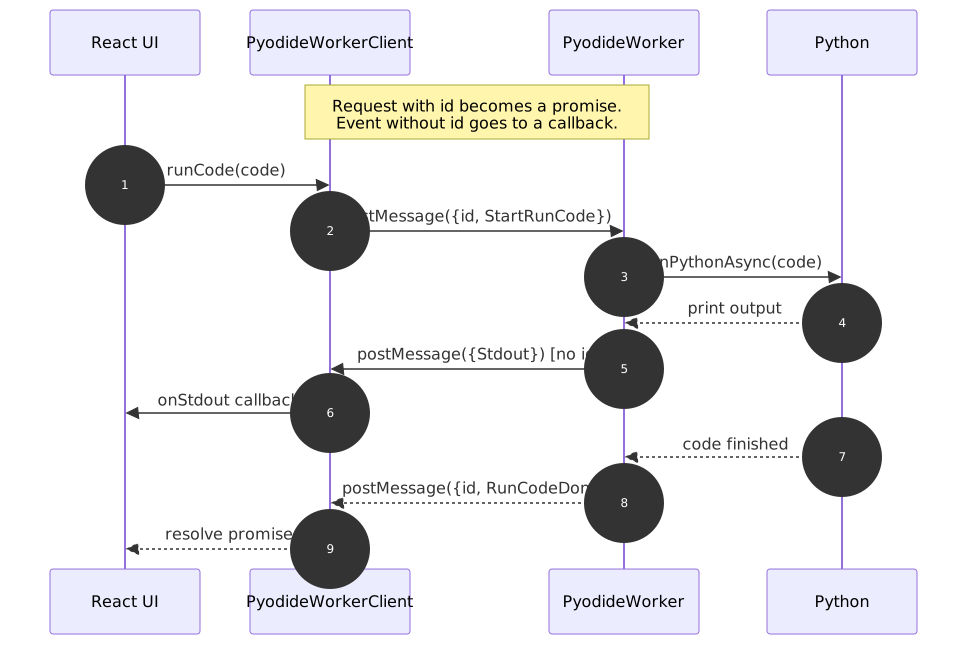
The diagram below shows what happens when user runs a program. There are two kinds of messages here. A command with id becomes a promise on the client side: runCode() returns a promise which resolves when worker answers with same id. But stdout chunks are sent without id — they are not responses to any specific request, they just arrive while code is executing. The client routes them to the onStdout callback, not to a promise.
This split is the core of the protocol: request-response with id vs fire-and-forget without id. Once you understand it, the rest of PyodideWorkerClient becomes obvious.
Debug pipeline
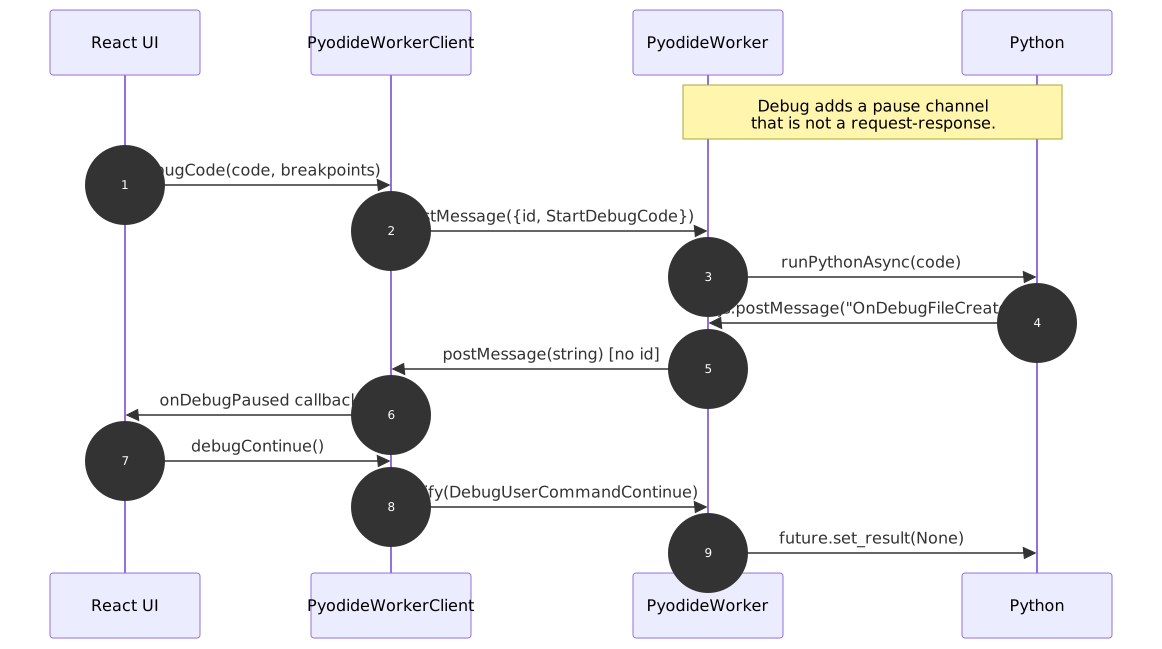
Debug uses the same protocol, but adds one more channel. The diagram below shows why debug needs a separate callback onDebugPaused instead of just resolving the debugCode promise on pause.
When execution hits a breakpoint, Python sends a message to the worker, and the worker forwards it to the client. This message has no id — it is not a response to any pending request. The debugCode promise is still pending at this moment: it will resolve only when debug session fully ends (program finished, user stopped, or exception raised). The pause event arrives in the middle of that pending request, so it has to go through a separate channel — the onDebugPaused callback.
After user clicks "Continue", the client sends DebugUserCommandContinue via notify (no promise, no waiting). Worker resolves the asyncio.Future inside Python, and execution resumes until next breakpoint or end of program.
Python code pipeline
When user clicks "Run" or "Debug", Python code goes through several transformations before it actually runs.
1. Code generation from blocks
Blockly generator walks through block graph and produces Python code as string. There are two generators created at the same time:
- execution generator — code which will actually run;
- display generator — code which is shown to user in preview.
Right now both produce same result, but they are kept separate because in future execution generator may add instrumentation which should not be visible in preview.
2. Stop signal transformation (run only)
Before running, code is transformed by transformCodeToRunReady.py. Each top-level statement gets an await _check_stop_run_code() call in front of it. This makes it possible to stop long loops: before each statement worker checks stop flag and raises exception if user requested cancellation.
Statements inside functions are not transformed — this is a known limitation. If user writes an infinite loop inside a function, stop button will not interrupt it until the function returns.
3. Breakpoint transformation (debug only)
In debug mode, code is transformed by transformCodeToDebugReady.py. Each top-level statement gets await _check_breakpoint(N) in front of it, where N is 1-based line number in original code.
When execution reaches line from breakpoints list, _check_breakpoint sends signal to main thread and waits on asyncio.Future. Debug UI then reads variables snapshot from worker filesystem and shows them to user.
User commands (continue, step, stop) are sent back to worker and either resolve the future or raise CancelledError inside paused coroutine.
4. Patch code
After transformation, patchCode.py runs once. It patches two things:
builtins.input— so thatinput()prints prompt, reads from stdin and echoes user's answer, like real terminal does. Without this patch prompts would stick together in output panel because stdin is not a terminal butio.StringIO.pandasandrequests— so that HTTP URLs go through CORS proxy. Without patch,pd.read_csv("https://...")would fail with CORS error in browser.
Patch is applied only once per worker session, guarded by flags (_CODECHEF_INPUT_PATCHED, _PATCH_APPLIED).
5. Execution
Final code is wrapped into async def _main() and executed through pyodide.runPythonAsync. stdin is installed as io.StringIO with text from "Ввод" tab. stdout is redirected to JS object which batches output and sends it to main thread every 50 ms.
File system
Pyodide has its own virtual file system (Emscripten FS). All files live in /home/pyodide/.
- Input files are uploaded by user and written to FS before run. They stay between runs.
- Output files are created by Python code (for example
df.to_csv("out.csv")) and are read from FS after run. - Internal files start with
__prefix (__debug_data.json,__exported_files.zip). They are filtered out from output files list.
Before each run, cleanFilesystemBesidesInputFiles removes everything except input files. This gives clean state between runs and prevents old output files from mixing with new ones.
Project file format
Project is saved as .chef file. It is JSON with two top-level keys:
python— generated code at save time. Stored for human readability, not used for loading.blocklyState— serialized Blockly workspace. Used to restore blocks.
Loading uses Blockly.serialization.workspaces.load. start_block is preserved as non-deletable and non-movable: if loaded state does not have one, it is created after load.